Airbnb Welcome Book: What to Include, Section by Section
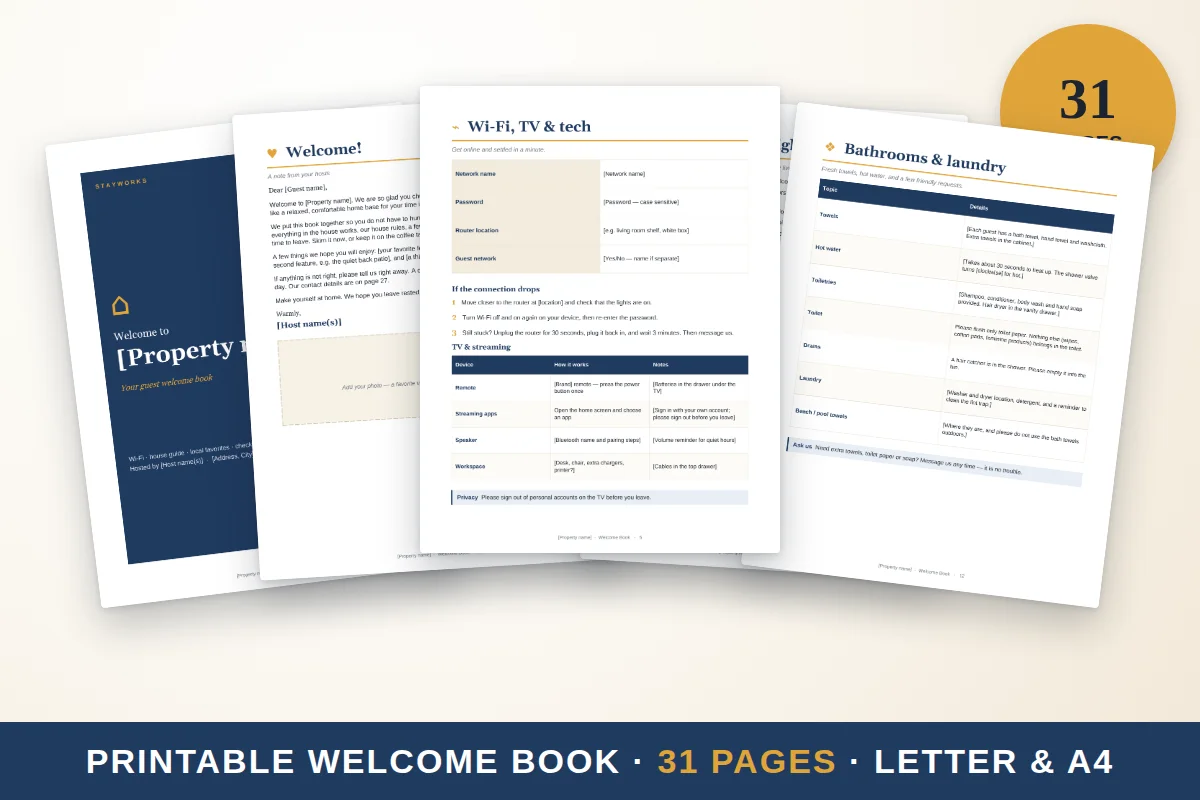
A good welcome book answers the questions guests ask in the first 24 hours: how to get in, how to get online, how things work, what the rules are and where to eat. Put those up front, add local tips and a feedback page, and keep everything easy to scan. This guide lists the sections, what to write in each and how to build the book in Google Docs or Word.
The sections
1. Welcome letter (half a page)
Say hello by name if you can, thank them for choosing your place, and tell them how to reach you. Keep it warm and short.
2. The house at a glance
A one-page summary: address, Wi-Fi name and password, check-in and check-out times, parking, and your contact number. This is the page guests will return to most.
3. Check-in and getting around the entrance
Step-by-step instructions for entry: key, lockbox or smart lock code, door that sticks, light switches. Add a photo of the entrance if it helps.
4. Wi-Fi
Network name and password, in large print. Mention where the router is and what to try if it stops working.
5. House rules
Quiet hours, smoking, pets, parties, extra guests. Make them short and friendly. See house rules examples.
6. How things work
Appliances and gadgets guests often ask about:
- Oven, stove and hood fan
- Coffee machine
- TV and streaming, with the remote steps
- Washer and dryer
- Thermostat, heating and air conditioning
- Hot water and shower quirks
A two-line instruction for each appliance prevents most messages. The house manual guide shows a deeper format.
7. Kitchen and bathroom basics
What is provided (oil, salt, coffee, towels, hairdryer) and what is not. Where the extra supplies are.
8. Trash and recycling
Which bins, which days, where the bins are. This is the most common source of neighbor friction.
9. Safety and emergency
Emergency numbers, nearest hospital or urgent care, where the fire extinguisher, first-aid kit and detectors are, and any known hazards. Add your own number for non-emergencies.
10. Local guide
- Food and coffee
- Groceries and pharmacies
- Shops and markets
- Outdoors and parks
- Rainy-day ideas
- Getting around: transit, rideshare, bike rental
Add three or four places you actually like. Honest, short notes beat long lists.
11. Kids and pets
If you welcome them, say what is available. If you do not, say so kindly.
12. FAQ
Answers to the questions you get most often.
13. Check-out steps
Time, short list, key return and thanks. See the check-out instructions template.
14. Guest book and feedback pages
Blank pages for notes and a feedback form. Read more in guest book ideas.
What to leave out
A welcome book fails when it is too long or too vague. Skip anything guests will not use during a stay: your life story, a long history of the building, repeated rules in several places or a full list of every restaurant in town. Skip anything that changes every week, such as event dates and temporary opening hours, or put it in a digital version you can update. Avoid wording that sounds like a warning. "Please keep quiet after 10 p.m. out of respect for our neighbors" works better than "Noise after 10 p.m. will result in penalties."
Keeping it up to date
Set a reminder every three months to check the book against the home. Is the Wi-Fi password the same? Has the coffee machine been replaced? Did a restaurant close? Ask your cleaner to tell you when the book is missing or damaged. When you change something, update the date on the cover so you always know which version is on the table. A book that is slightly out of date is worse than a short one that is right, because guests will notice and stop trusting it.
Layout tips
- Use large headings and short paragraphs.
- Use one or two fonts and one accent color.
- Put the Wi-Fi and the check-out time on separate, easy-to-find pages.
- Use photos sparingly; the entrance and appliances are the most useful.
- Print on standard paper, in a binder or folder that stays on the table.
- Add a QR code to a digital version so guests can open it on a phone.
Building it in Google Docs or Word
- Create a document with one heading per section above.
- Add a table of contents (Insert, then Table of contents) so guests can jump around.
- Use page breaks so each section starts on a new page.
- Export to PDF for printing and keep the editable version for updates.
- Update it when something changes, and note the date on the cover.
Printed and digital together
Print a short book for the table, and share a clickable digital version by link or QR code for guests who prefer a phone. A digital guide can include tap-to-call buttons, map links and Wi-Fi details.
A ready-made version
The Stayworks Host Kit includes a 31-page printable welcome book in US Letter and A4 PDF, plus the editable Google Docs and Word files, so you can change the text and add your own details. It also has a 27-page clickable digital welcome guide made for phones, with a linked index and tap-to-call and map links. You write in your details; the structure is done. It is $19.00 one time, and no design account is needed.
Quick checklist
- Start with Wi-Fi, check-in and check-out.
- Add rules, appliances, trash and safety.
- Add a short local guide.
- Add a feedback page.
- Keep a printed and a digital version.