How Much Does Airbnb Take From a Host? Work Out What You Keep
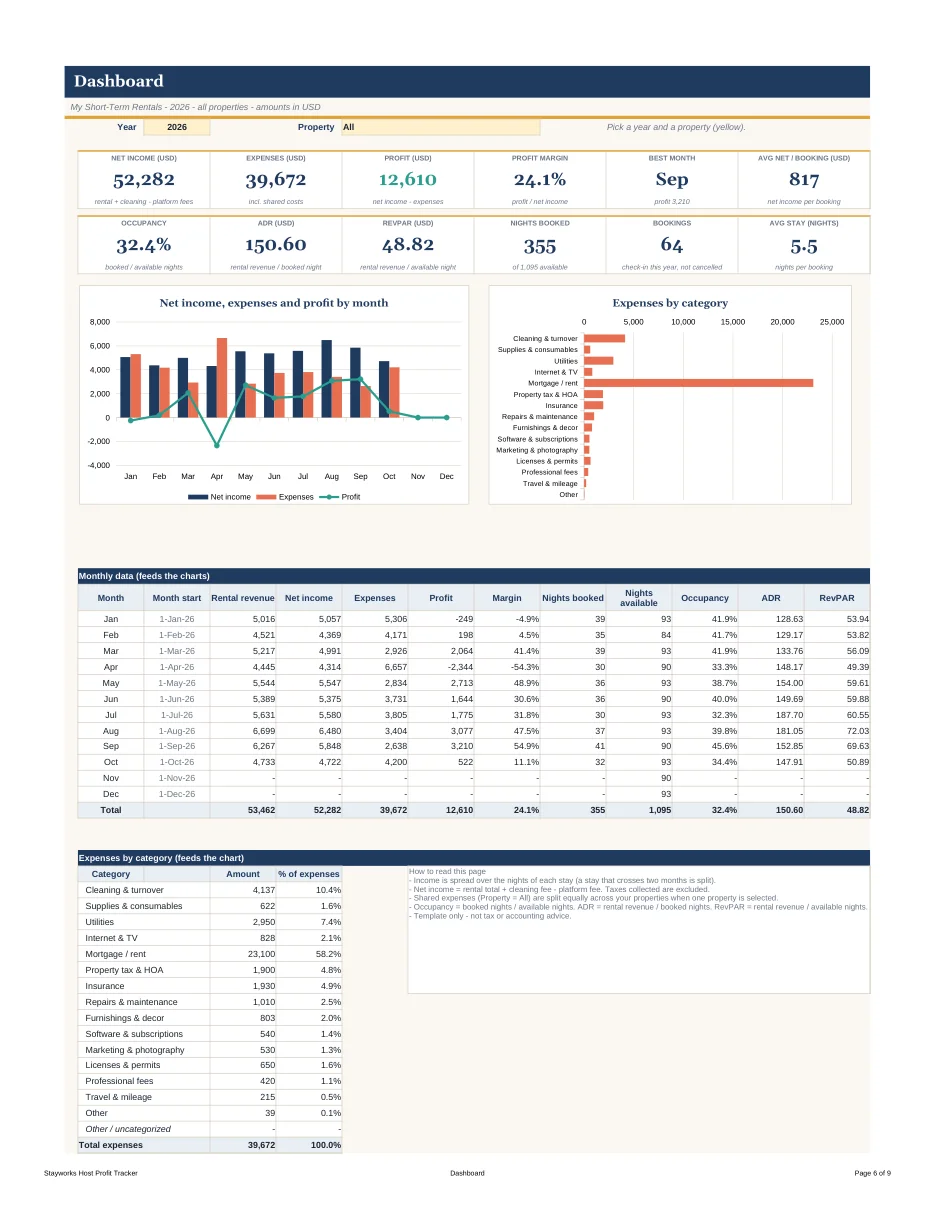
The platform takes a service fee out of each booking before the money reaches you, and the exact percentage depends on your account and changes over time. That is why this guide does not print a number. Look at the fee on your own payout, then use the method below to find the figure that matters more: what you actually keep after every cost of that stay.
This guide is not affiliated with any booking platform. It is general information for hosts, not tax or accounting advice.
Where the fee shows up
On most platforms you will see the same pieces on every reservation:
- Nightly rate × nights: what the guest pays for the stay itself.
- Cleaning fee: what you charge the guest to cover turnover. You usually pass this to a cleaner or do the work yourself.
- Platform fee: the amount the platform keeps for the booking. Where it appears (taken from you, added on top for the guest, or split) depends on how your account is configured.
- Taxes: collected in some places by the platform and in others by you, depending on local rules.
- Payout: the amount that arrives in your bank account.
Open three recent bookings and write down those five numbers for each. Most hosts have never done this side by side, and the pattern is often not what they expected.
From payout to profit
The payout is the middle of the story, not the end. A simple way to carry it all the way down:
| Line | Example (made-up numbers) |
|---|---|
| Payout from the platform | 420.00 |
| Cleaner for this turnover | −75.00 |
| Laundry and restock | −18.00 |
| Share of utilities for 3 nights | −12.00 |
| Share of monthly fixed costs (3 nights) | −60.00 |
| What you kept from this stay | 255.00 |
These numbers are only an illustration of the layout. Your own costs will differ. The point is that three different hosts can receive the same payout and keep very different amounts.
Four numbers that explain almost everything
- Net payout per booking: what arrives after the platform fee.
- Direct cost per booking: cleaning, laundry, consumables. These happen every time someone stays.
- Fixed cost per month: rent or mortgage share, insurance, internet, software, subscriptions.
- Nights booked: spreads the fixed costs across the month.
From these you can get profit per booking, profit per night and profit per month. If a property looks busy but profit per night is low, one of the first three numbers is usually the reason. See occupancy, ADR and RevPAR explained for how to read the nights side.
Common ways hosts lose track
- Mixing gross and net. A booking total and a payout are different numbers. Adding up booking totals makes a month look better than it was.
- Forgetting the cleaning fee goes out again. The cleaning fee a guest pays is income, and the cleaner is an expense. Counting only one side distorts both.
- Skipping small costs. Soap, coffee, light bulbs and printer paper look small. Over a year across several properties they are not.
- Using different methods per property. If one property tracks fees and the other does not, you cannot compare them.
- Waiting until tax time. Rebuilding a year from bank statements is slow and misses things. A habit of logging each booking when it ends is much easier. Our expense checklist lists categories worth tracking from the first day.
A five-minute routine after each booking
- Copy the booking dates, nights, nightly total, cleaning fee, platform fee and payout into your log.
- Add the cleaner's bill and any supplies bought for that turnover.
- Look at the one-line result: kept per night.
- Once a month, add the fixed costs and look at profit per property.
If you prefer to do this in a spreadsheet, you can build the columns yourself: guest, property, platform, check-in, check-out, nights (check-out minus check-in), nightly rate, cleaning fee, platform fee, taxes and net payout. Add a second tab for expenses with date, property, category and amount, then use SUMIFS to total each month by property.
Reading fees across several properties
If you host more than one place, build the habit of looking at fees per property rather than in one lump. Different properties can sit on different platforms, have different cleaning fee settings or different guest mixes, and the lump sum hides those differences. Put each booking against its property, then ask three questions at the end of the month. Which property kept the most per night? Which one had the highest direct costs per booking? Which one has fixed costs that only make sense when it is almost always booked? The answers often point to one cheap fix: a cleaning fee that no longer covers the real cost of a turnover, a supply you overbuy, or a minimum stay that is too short for the cost of each changeover.
A longer minimum stay is a good example. Every booking triggers a turnover, so many short stays multiply direct costs. Two three-night stays and one six-night stay can produce similar nightly totals but very different amounts kept. You will only see this if direct costs are logged against each booking.
If you would rather not build it yourself
The Stayworks Host Kit includes a ready-made Host Profit Tracker for Google Sheets and Excel. The bookings log already has columns for the platform fee, the cleaning fee and the net payout, nights are calculated for you, and the monthly profit and loss is split by property so you can see which ones really pay. The toolkit web app also has a profit-per-night calculator and a break-even tool for quick what-if checks. Sample data is included so you can see how it works, and you can delete it when you are ready. It is $19.00 as a one-time purchase.
Quick checklist
- Write down the fee from your last three payouts.
- Log the cleaner and supplies against the same booking.
- Compare properties on profit per night, not on nightly rate.
- Review fixed costs once a month.
- Keep your own notes on local tax rules and check them with a qualified professional.