Airbnb Occupancy Rate, ADR and RevPAR: How to Calculate Each
Occupancy rate is nights booked divided by nights available. ADR is revenue divided by nights booked. RevPAR is revenue divided by nights available, which is the same as occupancy times ADR. Those three formulas are all you need to read how a short-term rental is performing, and you can calculate them from a simple list of bookings.
The three formulas
| Metric | Formula | What it tells you |
|---|---|---|
| Occupancy rate | Nights booked ÷ nights available | How often the place is used |
| ADR (average daily rate) | Room revenue ÷ nights booked | What you earn on a night that sells |
| RevPAR (revenue per available night) | Room revenue ÷ nights available | Price and occupancy combined |
"Room revenue" here means the nightly rate for the stays. Decide whether to include the cleaning fee and write the rule down. Most hosts leave cleaning fees out of ADR so it reflects the nightly price, and track cleaning fees separately.
A worked example
A 30-night month. The property is open for all 30 nights. Bookings:
- Stay A: 4 nights at 140 = 560
- Stay B: 7 nights at 130 = 910
- Stay C: 3 nights at 160 = 480
- Stay D: 6 nights at 125 = 750
Nights booked: 4 + 7 + 3 + 6 = 20. Revenue: 560 + 910 + 480 + 750 = 2,700.
- Occupancy: 20 ÷ 30 = 66.7%
- ADR: 2,700 ÷ 20 = 135.00
- RevPAR: 2,700 ÷ 30 = 90.00 (also 66.7% × 135.00)
The numbers are invented to show the arithmetic. Run the same steps on your own bookings.
How to read them together
- High occupancy, low ADR: you may be priced too low, or you may be filling gaps with discounts. Check whether a small price increase would still keep the nights booked.
- Low occupancy, high ADR: price may be above what the market will bear in that season, or the listing and photos may not match the price.
- RevPAR flat while one of the others moves: you are trading one for the other. That is not necessarily bad, but it is useful to see.
None of these tell you profit. A high RevPAR with expensive turnovers can still be a thin month. Pair them with costs, as described in what you actually keep after fees.
Counting nights correctly
Nights come from dates, not from how many days a calendar shows as marked.
- A guest who checks in on the 3rd and out on the 7th stayed 4 nights (7 − 3).
- A stay that crosses a month boundary should be split, so each month gets its own nights. If you only log by check-in month, one month will look too busy and the next too quiet.
- Decide how to treat blocked nights, owner stays and maintenance. Write the rule once and keep it.
In a spreadsheet, nights is simply the check-out date minus the check-in date. To total nights in a month for one property, use SUMIFS on the nights column with the property name and the month as conditions.
Setting up the sheet
A minimal layout that works in Google Sheets and Excel:
- Bookings tab: guest, property, check-in, check-out, nights (formula), nightly rate total, cleaning fee, payout.
- Settings tab: list of properties, and the year you are tracking.
- Monthly tab: one row per month, with nights booked (SUMIFS), nights available (days in month, which you can get with DAY of EOMONTH), occupancy, revenue, ADR and RevPAR.
- A chart of occupancy and RevPAR by month.
Use IFERROR around the division so months with no bookings show zero rather than an error.
Comparing properties and seasons
Compare the same month year over year, and compare properties of a similar size against each other. Reading RevPAR by month shows seasonality: you can see which months carry the year and where a promotion, a longer minimum stay or a different price might be worth testing. Avoid comparing a studio against a four-bedroom house; the bigger one will always earn more per night without being a better business.
Common mistakes when calculating
- Using days on the calendar instead of booked nights. A stay that ends at 11 a.m. does not occupy the last day.
- Mixing currencies or taxes. Use the same basis every month: either the nightly total before taxes or the payout, but not both.
- Comparing against headline market numbers. Published averages cover many property types and dates. They are a rough context at best; your own history is a better yardstick.
- Reading a single month. One quiet month can be a holiday, a local event ending or a blocked week. Look at a rolling twelve months and at the same month last year.
- Ignoring minimum stays. A property with a seven-night minimum will show fewer bookings and a different ADR than one with a two-night minimum. Compare them only with that in mind.
Once you have the monthly numbers, add one more column: the average length of stay. Longer stays reduce the number of turnovers, which lowers direct costs per night even when ADR is the same.
Skip the setup
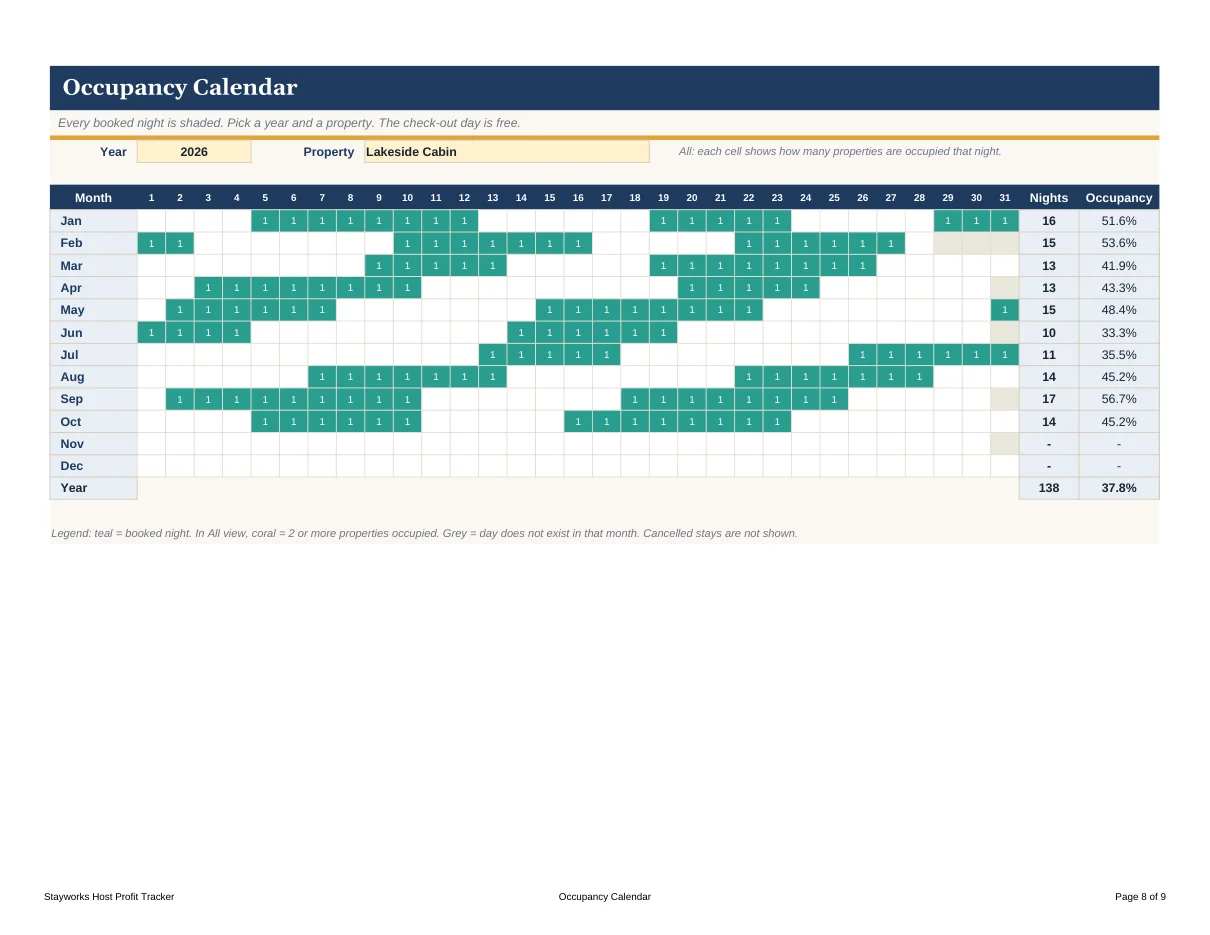
The Stayworks Host Kit includes a Host Profit Tracker for Google Sheets and Excel with these formulas built in. The dashboard shows occupancy, ADR and RevPAR, lets you pick the year and the property, and includes a property comparison tab and a calendar heatmap that shows your booked dates at a glance. You enter bookings; the sheet calculates. It is $19.00, one time, and includes sample data you can delete.
Quick checklist
- Count nights from check-out minus check-in.
- Split stays that cross months.
- Decide once whether cleaning fees count as revenue for ADR.
- Compare like with like: same property, same month, different years.
- Pair the three metrics with your costs before judging a month.